
Currently viewing the tag: "sampled"

In this video, I give a few tips for picking the right samples to use in your beats.

Feel free to drop a comments below and share your experience.

Tagged with:
 

I’m back with another sampled Hip Hop beat making tutorial. In this video, I break down the process I went through to make the instrumental “No Illusion”.  Hopefully this will offer some additional insight into my beat making process, rather than just another re-creation video.


The full-length, HQ & untagged beat, “No Illusion”,  is available for INSTANT DOWNLOAD at www.TCustomz.com

Video Transcript:

What’s up guys?  I just finished up this new beat.  And for this video I kind of want to break down the beat a little more and not just re-create it. But actually give some commentary and show the process that went into the beat.

Alright, so I started with the sample. That’s how most of my beats come together – find a sample first, or if I’m going to make a composed beat, start with a basic melody and then build from that.  So here’s a little preview of the sample that I used. *Plays sample snippet*

So the main sequence from the beat used that part of the sample, and then towards the end I actually picked some more of the guitar and made another sequence with that. So I went ahead and chopped up the sample *Previews sample chops*

I didn’t know what I wanted to do with it or even what kind of drum pattern I wanted to do.  So what I did first was I went and I found a drum break to start and just kind of give a foundation for the overall groove of the track and beat. And the drum break sounds like this. *Plays original drum break snippet*

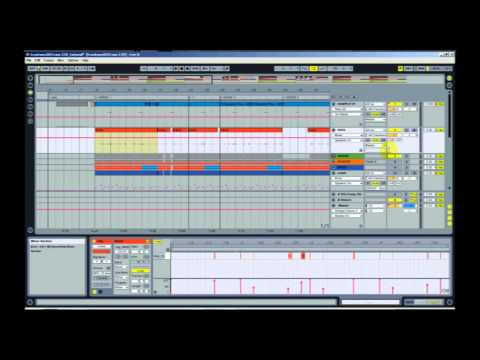
You can probably hear the bass in that drum break, the bass starts coming in pretty early.  So I ended up just using the first… not even the first bar.  I ended up taking a piece from the earlier part and making it into a one-bar loop.  And once I had the one-bar loop, I figured out that the tempo for the break was right around 87 BPM.  So that’s what I set the BPM for on my beat.  It wasn’t exact, so what I ended up doing was using the Ableton warp engine to kind of warp my main kicks and snares, and make sure the they’re on the grid and that everything lines up. And then just let all of the ghost notes and everything fill in between.  So after I did that, this is what it sounds like. *Previews modified break-beat*

So then I started working with the sample.  And overall, you’ll hear that I used the main melody as it was kind of in the sample.  But I didn’t just loop it.  I had to do a lot of precision work on the chops to make sure everything fit.  And then you’ll hear some fill-in notes… that I kind of did a reverse effect on to fill in some  gaps, because like I said it wasn’t just a loop.  So here’s what the first sequence sounds like *Previews first beat sequence*

And like I mentioned, towards the end of the sample, I ended up chopping up some more of the guitar and that’s what I made my second sequence from.  Here’s some of the chops *Triggers sample chops from pads on MPD32 controller* - And this is how the second sequence came together *Plays second beat sequence”

Once I had my two main sequences and the drum break going – the overall groove and structure for the beat – I went ahead and beefed up the drum sounds. I ended up running a parallel, or New York style, compression for the drum break just to kind of emphasize some of the main kick and snare notes, just to give it a little more substance.  And then to make it stand out even more, I ended up layering a kick and snare underneath of the drum break to emphasize those main notes. So here’s the break *Plays newly processed drum break* – The snare snaps a little more… and bring in the sample. *Plays first beat sequence*

So next in line was a bass line.  I just ended up making a pretty simple bassline, just to give it some low end.  And so from that point, it was basically just to fully sequence and arrange everything out, and make it into sort of like a song structure – maybe give it a hook or something.  I ended up using the first sequence overall, for the main verse – for the 16s, and then the second sequence was my eight for the hook.

This wasn’t a crazy complicated beat in terms of the number of sounds that were used – sample, drum break, kick and snare, and bass – but I spent a lot of time trying to get my chops right.  I don’t like my chops to be sloppy.  And then definitely having that second sample sequence breaks up the monotony and doesn’t necessarily require you to add a lot of crazy extra instrumentation or anything like that.

So that’s pretty much it. That was pretty much the process for this beat.  I hope that offers you all some insight.  Again, drop a comment and let me know what you think.  If this was helpful – if I talked about something that you want more details on, drop a comment and let me know.

I’ll catch you guys in the next video. Thanks for watching! Peace. *Final beat plays at end*

I was digging through some soul records and found this dope Motown sample.  This beat has boom bap style drum work with my own flavor on the sample chops.

The beat is entitled “Long Way Back”, and the full-length, untagged instrumental is available for license w/ Instant Delivery at www.TCustomz.com.


Please take a second to Comment, “Thumbs Up” & Subscribe if you enjoyed the video. Thanks!

A new Hip Hop instrumental, entitled “Grind Time”, has been uploaded and is now available for license at TCustomz.com.  This particular beat has been locked away in the vault for quite some time.  You may have heard a snippet of it on the TCustomz Drum Sample Pack Vol. 2 preview. Although the drums were already released, the instrumental was not previously available, until now.

Purchase the high quality, untagged beat, “Grind Time”, at www.TCustomz.com w/ Instant Delivery today!

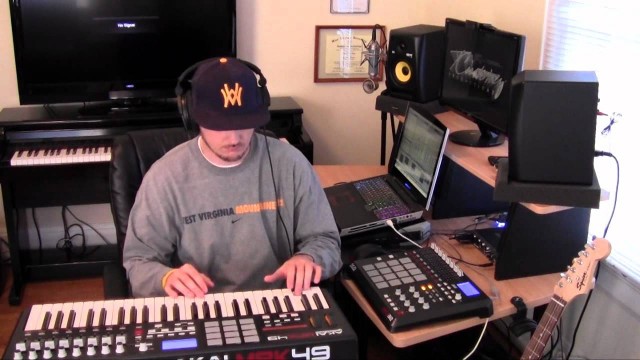
I’m back with a new Hip Hop beat making video, where I’m sampling a soul record.  I step through most of the elements that went into the beat, from chopping the sample, to laying down the drum track,  to adding a couple filtered breakbeats for ambiance, and the final percussion and bass line.  I also added a vocal sample for the hook which will play at the end of the video.  The gear I am using is an Alienware M17x, Ableton Live 8 (DAW), Akai MPD32 (with modified pads) & an M-Audio Fast Track Ultra audio interface.

If you liked the video, please take a second to drop a Comment, Thumbs Up & Subscribe to the Youtube Channel.  Also, the full-length, HQ beat is available for purchase at www.TCustomz.com with Instant Delivery along with our extensive instrumental catalog!

Tagged with:
 

Here is the Part 2 bass line tutorial as promised.  Instead of this being two-part series as I had first mentioned, I have included extra info in this tutorial to help you in preparation for recording your bass line and Part 3 will cover the final recording process.

This tutorial covers:

Filtering the Sample using a High-pass Filter (HPF):  By applying a HPF to your sample, you will be removing some of the lower (bass) frequencies and allowing room for the bass line you are going to compose. As I mention, I usually set my filter threshold at around 200-300 Hz.  If you don’t apply a filter to your sample, you may run into problems with the low-end frequencies clashing during your mixing process.

Picking a Bass Sound: Picking an appropriate bass sound  really comes down to your personal preference and the track that you’re working on.  I highly recommend Spectrasonics Trilian if you are looking for a solid bass virtual instrument to use with your DAW.  There are a ton of awesome presets and the patches are pretty easy to tweak if needed.

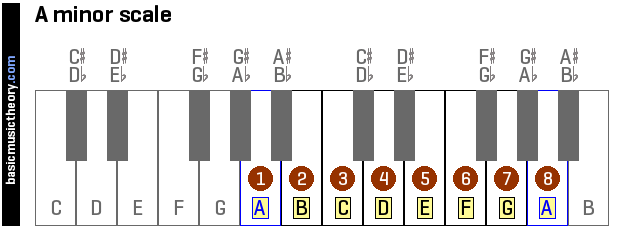
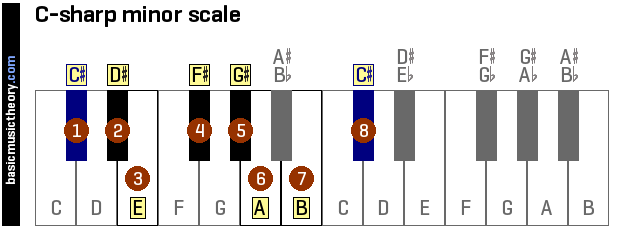
Finding the Key: Having some music theory under your belt (as I talk about in the Bass Line Tutorial Part 1) is very helpful when trying to identify the key of your sample.  BasicMusicTheory.com has some good information to get you started.

Transpose the Bass to a “Playable” Key: For those of you who aren’t fluid at playing the keys, this step should help you out.  This will help you transpose a key like C#m:

c-sharp-minor-scale-on-piano-keyboard

and transpose it into a more “playable” key like Am, where you are only playing white keys:

a-minor-scale-on-piano-keyboard
Hopefully this offers you some more insight into the process I go through to create a bass line for a sampled beat.  If you missed the Part 1 tutorial, you can watch it here.

SUBSCRIBE to our Youtube Channel for all our latest beat making videos and tutorials!
Until next time, Happy Beat Making! – www.TCustomz.com

Feel free to drop a comment below

Tagged with:
 

In this beat making video, I create a new soul-sampled Hip Hop beat entitled “Been A Minute” using an Akai MPD32 and Ableton Live 8.  If you like this video, please take a second to drop a Comment, Thumbs Up & Subscribe.  The full-length, HQ & untagged version of this beat is available for purchase at www.TCustomz.com with Instant Delivery!

In this step-by-step tutorial, I break down the process of making a sampled Hip Hop beat, entitled “You Already Know”.  This instructional video covers all aspects of creating this track including:

SAMPLE
- Chopping up the sample and making a basic sequence
- Adding Effects to the sample including: Attack, EQ/filtering, Widening & Reverb/Delay.

DRUMS & HI HATS
- Creating a drum track and layering various drum samples
- Processing drum samples using parallel compression (also known as New York compression)
- Quantization & velocity variation
- Applying Ableton Live grooves (MPC swing in this case) to get an unquantized, Hip Hop sounding drum track.

BASS LINE
- Loading a single bass note into an Ableton sampler, and playing it across a full keyboard
- Having two bass line tracks (one pitched up an octave) running in parallel

PERCUSSION & TRANSITION FX
- Adding some “sprinkles” to the beat

HOOK
- Finding additional sample stabs for the hook
- Adding a synth melody using Spectrasonics Omnisphere vsti (awesome plugin!)

FINALIZATION
- Final sequencing of the beat (multiple verses, variations, dropouts, etc)
- Adding finishing FX
- Mixing & Mastering (Live’s Analog warmth & iZotope Ozone)

If this video was helpful, please take time out to check out the other videos on the YouTube Channel (don’t forget to subscribe!)

TCustomz.com, your #1 source for authentic Hip Hop beats & drum kits!

Tagged with:
 

This is a quick beat making tutorial showing you the different effects that I add to most of my sampled beats.  As I mention in the video, I have talked about many of these effects before in some of my other Ableton Live tutorials, but I wanted to make a video dedicated to this.

In this video I discuss the following:
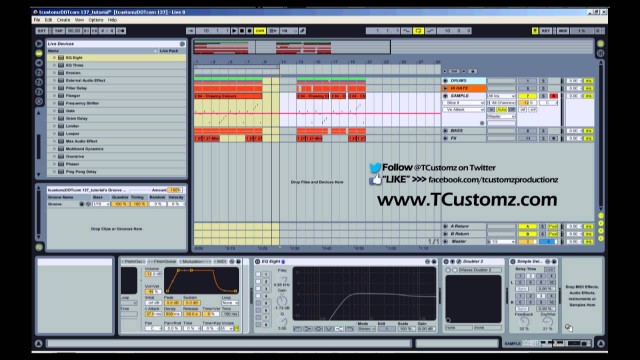
1) Pitching your Sample: Once the sample is chopped (in this case I am using an Ableton Live Drum Rack), the first thing I like to do is find the appropriate pitch and tempo for the sample. Using the transpose is an excellent way to achieve this.

2) Adding Attack to your Sample: Using an attack is recommended for most sampled beats, especially if you tend to chop your samples on an existing kick or snare drum. Adding a small attack to each of your sample slices will allow each one to quickly fade in once it is triggered. This allows space for you to create your own drum track over top of the sample without conflicting with the original drums.

3) EQ / Filtering your Sample: Filtering the bass out of your sample with a high-pass filter (HPF) is also recommended to allow room for a new bass line – unless, of course, you are planning to use the bass line from the existing sample, using a technique like low end theory. For this particular beat, I added a multiband EQ so that I could also remove some of the high frequencies from the sample.

4) Widening your Sample: Widening is technique used to take advantage of the stereo field.  For more information, check my video tutorial on how to widen your sample.

5) Adding Delay / Reverb to your Sample: Lastly, I talk about adding delay and/or reverb to your sampled instrumentals. These are great effects for blending your sample chops together and making them more cohesive.

If this tutorial was helpful, please make sure to check out the Official TCustomz.com YouTube Channel (don’t forget to SUBSCRIBE).  You can also “LIKE” the TCustomz Facebook Page and “FOLLOW” @TCustomz on Twitter.

TCustomz.com, your #1 source for authentic hip hop beats & drum kits!

_________________________
“FOLLOW” @TCustomz on Twitter
“LIKE” us on Facebook >>> facebook.com/tcustomzproductionz
www.TCustomz.com

Tagged with:
 

Three new sale beats were added to the website! Get exclusive rights to “Memory”, Too Blind to See” and “Your Time” – as well as the rest of our sale beats catalog – for only $99! Standard Leases are only $9 – LIMITED TIME ONLY! Purchase Your Sale Beats Now!

New Sale Beats added!

Tagged with: